Tags
NotebookLM
GoogleAI
GeminiAI
AIProductivity
AIResearchAssistant
INTRODUCTION
NotebookLM is an AI-powered research and note-taking assistant from
Google, designed to help users organize, understand, and engage with
their own documents. Think of it as a personal research partner, capable
of reading your files, answering questions, summarizing complex topics,
and even generating podcasts based on your content.
Originally launched in 2023 as Project Tailwind, NotebookLM has evolved
into a sophisticated tool integrated into the Google Workspace
ecosystem, accessible on web, Android, and iOS.
NotebookLM Accepted Sources
NotebookLM can help you
summarize and extract information from various sources.
It accepts a wide range
of document types, including:
- PDFs (.pdf)
- Google Docs (.doc)
- Google Slides (.ppt)
- Microsoft Word (.docx)
- Plain text (.txt)
- Markdown (.md)
- Copied and pasted text
- Website URLs (public URLs)
- YouTube URLs (public videos with captions)
- Audio files (e.g., MP3, WAV, among others)
- Images: While it mentions support for .png, .jpg, and .jpeg
NOTE: Spreadsheets: Currently, NotebookLM does not support Excel
(.xlsx) or other
spreadsheet file types directly.
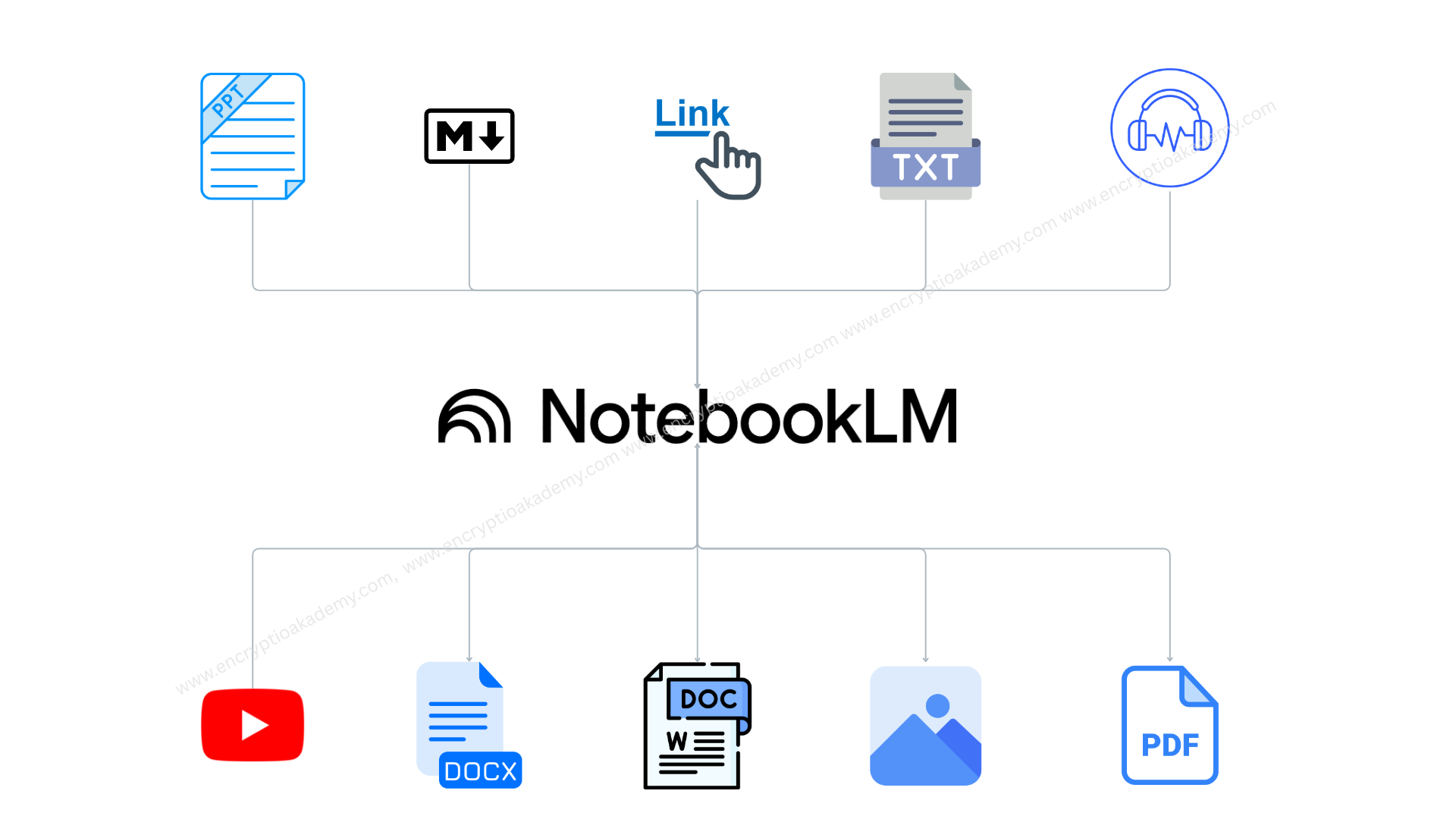
notebooklm-accepted-sources
NotebookLM Free and Subscription
Versions
NotebookLM can help you
summarize and extract information from various sources.
It accepts a wide range
of document types, including:
- Standard NotebookLM (Free)
- Notebooks per user: 100
- Sources per notebook: 50
- 200MB (for local uploads like PDFs)
- upto 500,000 words
- Queries per notebook (daily): 50
- Audio overviews per notebook (daily): 3
- NotebookLM Pro (Paid):
- Notebooks per user: 500
- Sources per notebook: 300
- 200MB (for local uploads like PDFs)
- 500,000 words (the word limit per source remains the same)
- Queries per notebook (daily): 500
- Audio overviews per notebook (daily): 20
Everything NotebookLM Can Do
NotebookLM can help you
summarize and extract information from various sources.
It accepts a wide range
of document types, including:
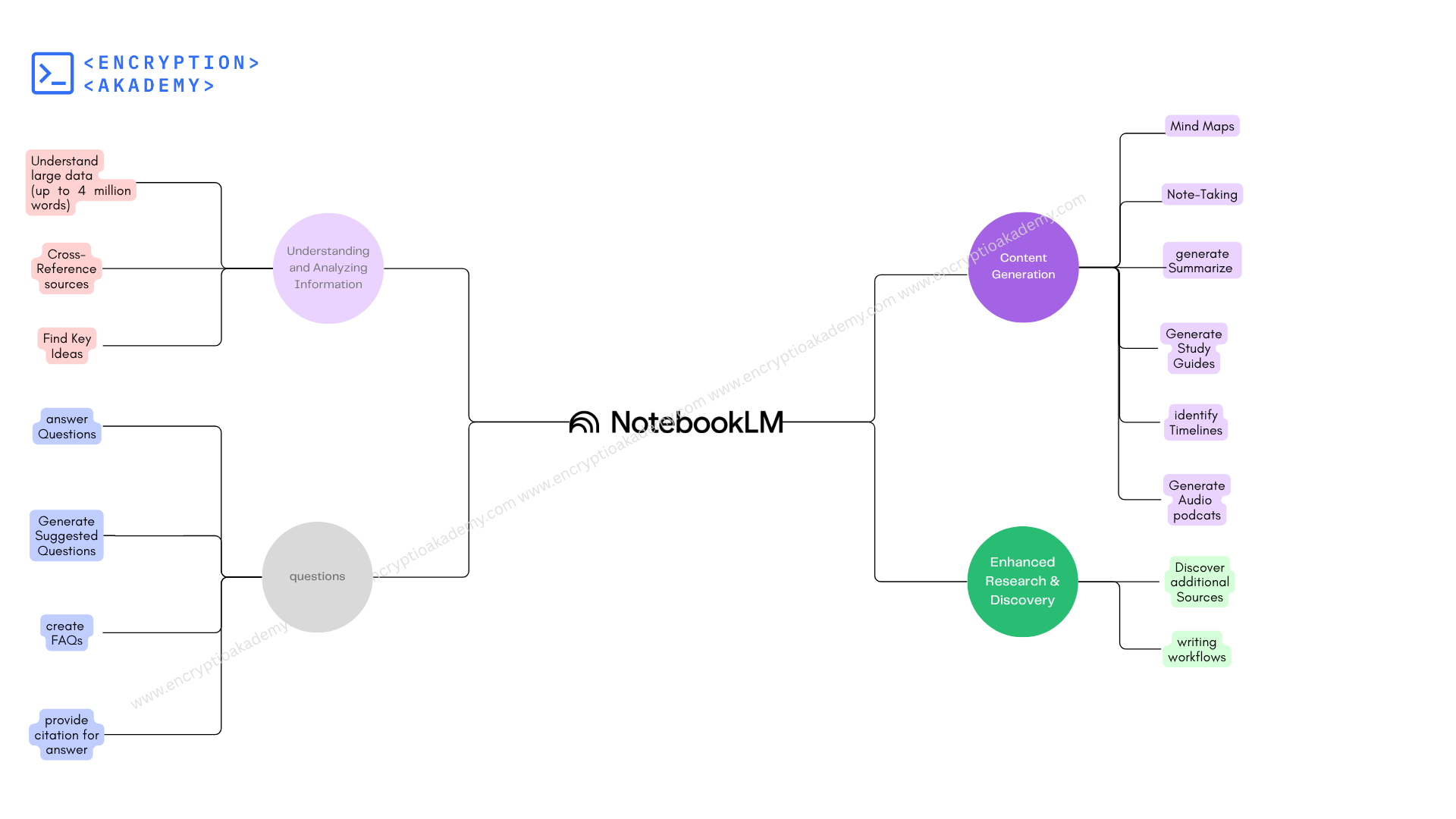
everything notebooklm can do
Understanding and Analyzing Information:
- Analyse Large Datasets: It can analyse large data
upto 500,000 words and supports upto 300 sources.
- Cross-Reference: See how different documents are related,
even if they’re from
different sources.
- Find Key Ideas: Identify and highlight the most important
ideas,
facts, and
concepts in your documents.
- Analyze Multiple Documents: Compare and connect information
across
several
documents to find patterns and common themes—useful for big
projects.
- Understand Context: The AI understands your specific
materials, so
it gives
answers based on your data, not random guesses.
Questions and Explore:
- Answer Questions: Get answers directly from your uploaded
files.
- Suggested Questions: NotebookLM suggests follow-up questions
to help you learn
more.
- FAQs:Make a list of common questions and answers from your
documents.
- Citations for Answers:Every answer comes with the exact
source and location in
your documents.
- Customize Chat Style: : Choose how the AI responds—more like
a guide or an
analyst, and pick shorter or longer answers.
Create New Content:
- Mind Maps: Visualize your ideas and how they connect.
- Make Briefing Notes: Summarize key points for quick reading
or presentations.
- Summarize Documents: Quickly create summaries of one or more
documents to
understand the main points.
- Study Guides: Create study materials with questions and
answers from your
documents.
- Timelines: Organize events and facts into timelines.
- Audio Summaries: Turn your materials into podcasts you can
listen to.
- Interactive Audio: Talk to the AI during an audio session—ask
for clarifications
or more details.
- Brainstorm New Ideas: Find new trends, ideas, and product
concepts by analyzing
your materials.
Stay Organized and Collaborate:
- Notebooks:
Keep your documents and notes in separate notebooks for
different
topics or projects.
- Add Your Own Notes: Write and save your own notes alongside
the documents.
- Share and Work Together: Share your notebooks with others and
collaborate—give
them "view" or "edit" access.
- Notebook Analytics: For shared notebooks, see how many people
have viewed them
and how many questions they’ve asked.
Find New Information:
- Find More Sources: Search the web for extra information
related to your
notebook.
Frequently Asked Questions (FAQ)
Is Notebooklm free?
NotebookLM offers both free and paid versions, catering
to different user needs:
The standard version of NotebookLM is completely free
for anyone with a Google account. It provides access to
core features such as document uploads, summarization,
Q&A, and audio overviews. This version is ideal for
casual users, students, or professionals who require
basic AI-powered research assistance.
For users seeking enhanced capabilities, NotebookLM Plus
is available through the Google One AI Premium
subscription. This plan includes:
1. Increased Usage Limits: Up to 500 notebooks,
300 sources
per notebook, 500 daily chat queries, and 20 audio
generations per day.
2. Advanced Features: Enhanced sharing options,
customization tools, and integration with other Google
AI services like Gemini Advanced.
3. Pricing: $19.99 per month, with a 50% discount
($9.99/month) for eligible U.S. students aged 18 and
over for the first year.
Can notebooklm transcribe audio?
Yes, NotebookLM can transcribe audio files and generate
summaries or analyses based on them.
NotebookLM supports the upload of audio files, such as
MP3 and WAV formats. Once uploaded, the system can
transcribe the audio content, allowing you to:
- Search within the transcribed text
- Generate summaries or study guides
- Create AI-generated audio overviews
can notebooklm read handwriting?
Yes, NotebookLM can read and process handwritten notes,
provided they are uploaded in a compatible format.
NotebookLM can effectively interpret handwritten content
when it's uploaded as:
PDF files or as
Scanned images
What are alternatives available for notebooklm ?
several tools offer similar or enhanced functionalities
tailored to various needs, such as AI-driven
note-taking, research assistance, podcast generation,
and local deployment. Here's a curated list of
noteworthy alternatives:
| Tool |
Key Features |
Pricing |
| NotebookLM
|
AI-powered summaries, Q&A,
podcast overviews |
Free (Google account
required) |
| ClickUp
|
Task management, AI notes,
meeting summaries |
Free + premium plans |
| Notion
AI |
AI writing, summaries,
databases |
Free + premium plans |
| Roam
Research
|
Networked notes,
bidirectional links |
Paid ($15/month) |
| Obsidian
|
Markdown notes, local
storage, plugins |
Free + commercial licenses
|
| Jellypod
|
AI podcast creation,
regional voices |
Paid (details TBD) |
| NotebookLlama
|
Open-source, text-to-podcast
|
Free (open-source) |
| SurfSense
|
Browser AI, local knowledge
base |
Free (open-source) |
| tldw
|
Open-source summary +
transcription |
Free (open-source) |
| SciSpace
AI |
Paper summaries,
explanations |
Free + premium (from
$8.34/month) |
| Afforai
|
Smart summaries,
context-aware Q&A |
Free + premium |
Is notebooklm available for android?
Yes, NotebookLM is now available as a dedicated Android
app, offering a seamless and powerful experience for
research, note-taking, and AI-driven insights on the go.
You can download the
NotebookLM app from the
Google Play
Store.
Alternatively, you can visit the official NotebookLM
website for more information and access to the app.
 Published: 1 Jun
2025
Published: 1 Jun
2025 5-min
read
5-min
read